Frequently Asked Questions
Click on the question to see the answer.
Questions about Registration
What should I do if I forgot my password?
You can currently reset your password only via our WebApp. Learn how to reset your password in the WebApp here.
Questions about Orders
How do I order food?
Food can be ordered in the "Meal Plan" menu. Use the "+" button to increase the number of portions and "–" to decrease them. Finally, confirm the order by clicking the "Order" button at the bottom right of the screen.
Until when can I change or cancel orders?
Your caterer sets the deadlines for ordering and canceling. The deadlines are displayed next to the respective dish. After the deadline, no changes are possible.
Questions about Customers and Meal Participants
What is the difference between customers and meal participants?
Meal participants = children (Children are referred to as meal participants in the School Menu Planner program to distinguish them from customers.) Each meal participant is assigned to a customer. Customers are invoice recipients. When adding meal participants, a customer number is generated. Customers can have multiple meal participants assigned to them. Food orders are placed for the meal participant. Orders are tied to the meal participant. An invoice is generated for each meal participant if orders were placed.
How can I add a new meal participant?
Open the Meal Participants menu and select the "+ Add Meal Participant" option to add a new person. Then select the facility where the new meal participant will eat.
How do I cancel customers/meal participants?
Parents can cancel meals and any existing standing orders themselves. If you want to completely stop the meal service, contact your caterer directly and inform them of the change request. Cancellation is not done through the app. Meal participants assigned to the archive will still be displayed in the customer area.
How do I record a facility change (class or group change)?
A change of facility, class, or group is not automatically made in the School Menu Planner.
If you have a standing order for your meal participant:
If you change the facility of a meal participant, the previous standing order is valid only until the change date.
All orders after the change will be automatically canceled.
You can set up a separate standing order for the new facility.
How to change the facility of a meal participant:
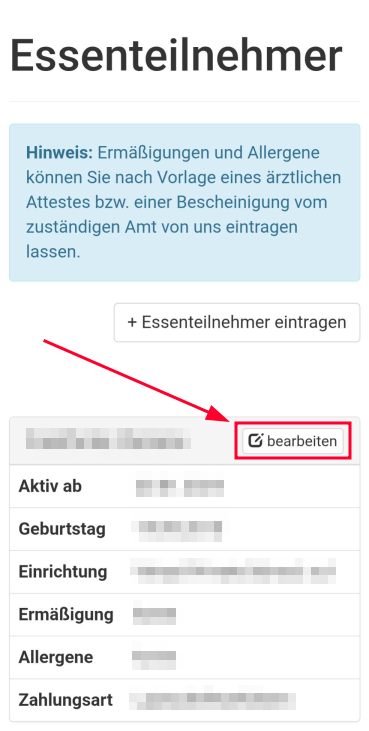
1. Click "edit" next to the name of the meal participant.
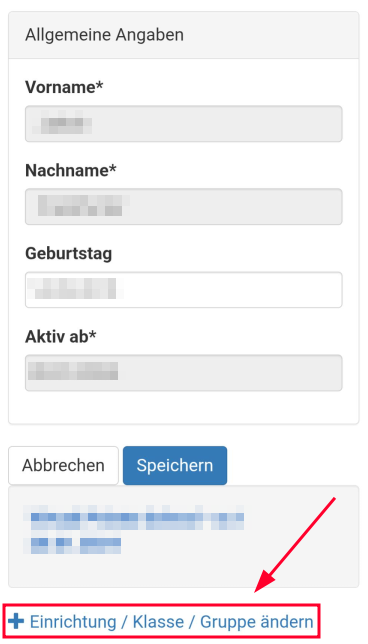
 2. Scroll to the bottom of the next page and click "Change Facility / Class / Group".
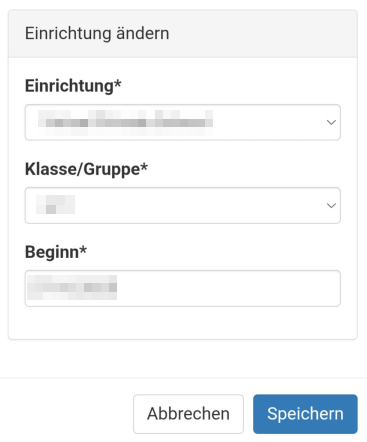
 3. Enter the new facility, class, or group and the desired start date.
 Note:
Please be careful!
You cannot edit the entry after saving.
Note:
Please be careful!
You cannot edit the entry after saving.
How do I transfer credit between two meal participants?
If you want to transfer credit between two meal participants, navigate to the "Meal Participants" menu and click the "Transfer Money to a Child Account" button.
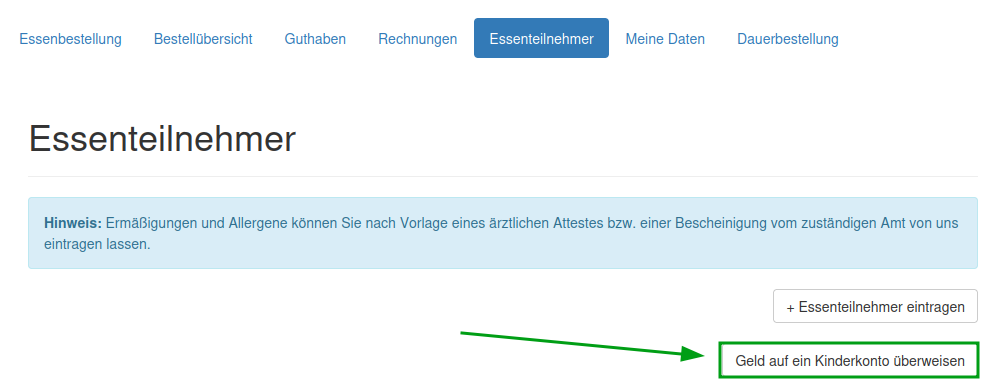 Select the respective meal participants and the amount.
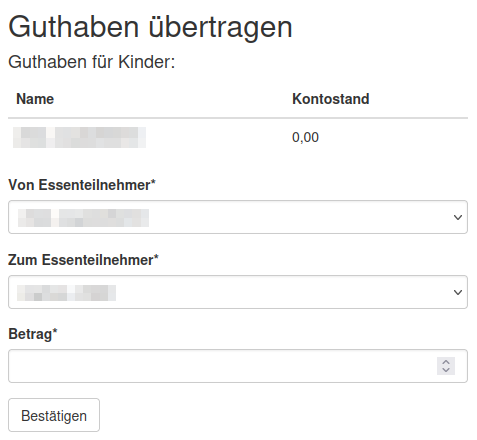 Confirm your entries.
Other Questions
How does ordering work in the credit system?
You create credit for your customer account by transferring money (prepayment) to a catering account, and this is assigned to the respective child. Note: Available credit can also be distributed among the children of a customer. Your current credit is displayed in real-time. (Under the name of the meal participants when ordering food.) Ordering is simple via the shopping cart. Select the desired menus and confirm your selection. After confirmation, the amount is directly deducted from the credit. The updated amount is immediately visible in the app. If you remove an order within the cancellation period, a notification will appear at the bottom of the screen. The order will be canceled, and the amount will be automatically credited back to your account.